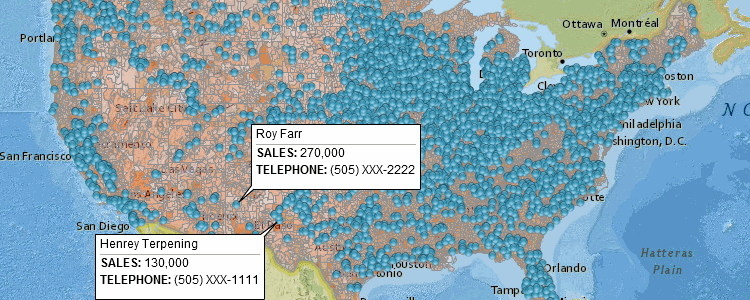
For many US businesses, maps begin with convenience. A quick embed, a familiar interface, and instant recognizability make Google Maps the default choice. But as companies mature, scale operations, or move into data-driven decision-making, a critical question emerges:
Should we keep using Google Maps, or invest in custom maps?
The answer is not about which option is “better” in general. It is about fit for purpose. Google Maps and custom maps serve fundamentally different business needs, and understanding those differences is essential for making the right choice.
What Google Maps Is Designed For
Google Maps is a consumer-first navigation platform. Its primary goals are:
- Helping people get from point A to point B
- Providing familiar landmarks and directions
- Supporting discovery of nearby places
For businesses, this makes Google Maps excellent for:
- Store locators
- Basic directions
- Customer-facing navigation
- Quick, low-effort implementations
If your goal is simply to show customers where you are, Google Maps often works perfectly well.
Where Google Maps Starts to Fall Short for Businesses
As soon as maps are used for analysis, operations, or persuasion, Google Maps reveals its limitations.
Common challenges include:
- Visual clutter from roads and labels that don’t matter
- Limited control over styling and hierarchy
- Difficulty representing proprietary data clearly
- Licensing and usage constraints
- Weak alignment with brand identity
Google Maps shows the world as Google defines it, not as your business needs to understand it.
What Custom Maps Are Designed For
Custom maps are built around business logic, not navigation.
They are designed to:
- Highlight only relevant data
- Encode business meaning visually
- Support analysis, planning, and decision-making
- Align with internal workflows and branding
Instead of asking users to interpret a generic map, custom maps present geography as structured insight.
Decision-Making vs Wayfinding
This distinction is critical.
- Google Maps excels at wayfinding
- Custom maps excel at decision-making
US businesses increasingly rely on maps to answer questions like:
- Where should we expand next?
- Which regions are underperforming?
- Where are risks concentrated?
- How do resources need to be allocated?
These questions cannot be answered effectively with consumer navigation maps.
Branding and Credibility Matter in B2B Contexts
In B2B sales, consulting, enterprise SaaS, and public sector work, perception matters.
Using Google Maps in presentations can unintentionally signal:
- Prototype-level thinking
- Generic solutions
- Limited investment in customization
Custom maps, by contrast, signal:
- Seriousness and maturity
- Domain expertise
- Long-term commitment
For US enterprise buyers and government stakeholders, this visual credibility often influences trust before features are even discussed.
Data Visualization and Insight Density
Google Maps is not optimized for complex data visualization.
It struggles with:
- Heatmaps with nuanced thresholds
- Layered demographic or operational data
- Temporal comparisons
- Scenario modeling
Custom maps are designed to handle:
- Proprietary datasets
- Aggregation and clustering
- Clear visual hierarchies
- Interactive filtering
When geography becomes a canvas for insight rather than a background, custom maps consistently outperform.
Control Over What the User Sees
One of the biggest advantages of custom maps is intentional omission.
Google Maps shows:
- Roads you don’t use
- Landmarks you don’t care about
- Labels unrelated to your business
Custom maps show:
- Only what matters
- In the order it matters
- At the scale it matters
This reduction in cognitive load is especially important for US executives and operators who need clarity, not exploration.
Licensing, Compliance, and Risk
Many US businesses underestimate the operational risk of relying on third-party map screenshots or embeds.
Google Maps usage involves:
- Licensing restrictions
- Attribution requirements
- Limits on redistribution and modification
As companies scale—especially into regulated industries—these constraints become friction points.
Custom maps provide:
- Full ownership and control
- Clear compliance boundaries
- Freedom to reuse maps across sales, marketing, and operations
For long-term use, this control often justifies the initial investment.
Performance and Product Integration
In SaaS products and internal tools, performance is a trust signal.
Google Maps:
- Loads consumer-focused assets
- Prioritizes visual completeness over speed
- Can feel heavy in data-dense dashboards
Custom maps:
- Are optimized for specific datasets
- Can be tuned for speed and scale
- Integrate cleanly into product workflows
US tech teams consistently find that custom maps feel more “native” inside their products than embedded consumer tools.
When Google Maps Is the Right Choice
Despite its limitations, Google Maps is still the right tool in many scenarios.
Use Google Maps when:
- You need quick deployment
- The map is purely for navigation
- Branding and data differentiation are not critical
- The use case is customer-facing and simple
For early-stage startups and small businesses, Google Maps often provides sufficient value at minimal cost.
When Custom Maps Are the Better Choice
Custom maps are the better option when:
- Geography drives strategy or revenue
- Maps are used in sales or investor presentations
- Data visualization and insight matter
- Brand differentiation is important
- Maps are embedded in products or dashboards
- Long-term scalability is a concern
In these cases, Google Maps becomes a constraint rather than a solution.
The Hidden Cost of “Good Enough”
Many US businesses stay with Google Maps longer than they should because it feels “good enough.”
Over time, this leads to:
- Confusing presentations
- Slower decision-making
- Reduced credibility with sophisticated audiences
- Technical debt in products
Custom maps are often adopted not because Google Maps fails—but because the business outgrows it.
A Strategic Framing for the Decision
The simplest way to decide is to ask:
Is the map answering a question, or just showing a location?
- If it’s showing a location → Google Maps is usually fine
- If it’s answering a question → Custom maps are usually better
This framing cuts through preference and focuses on function.
Why Many US Businesses Eventually Switch
Across industries—consulting, logistics, SaaS, real estate, public sector—the pattern is consistent.
Businesses:
- Start with Google Maps for speed
- Hit limits as complexity grows
- Move to custom maps for clarity and control
This transition reflects maturity, not extravagance.
Conclusion: Choose the Map That Matches the Job
Google Maps and custom maps are not competitors—they are tools designed for different purposes.
Google Maps excels at navigation, familiarity, and convenience. Custom maps excel at clarity, insight, and strategic communication.
For US businesses, the right choice depends on what the map is meant to do. If geography is central to your strategy, operations, or storytelling, custom maps are not a luxury—they are infrastructure.
For mapsandlocations.com, this distinction sits at the core of effective mapping: the most valuable maps are not the most detailed or familiar ones, but the ones that make the right decision obvious.